
5 Presentation Strategies to Keep Employees Motivated
Storytelling and interactive elements help create presentations that keep employees motivated and productive.
Updated February 10, 2026

B2B margins are thin, leaving little room for assumptions or legacy ways of working. This piece considers everyday operational gaps that quietly eat into profits and breaks them down with concrete examples.
Expect to take away practical fixes that shift the burden of accuracy from people to workflows. Implementing these fixes would serve as a first step towards improving performance and the bottom line.
Many B2B teams measure growth through lead volume because it’s easy to report. The cost of processing those leads rarely receives the same scrutiny. Issues arise when marketing hands over a batch of qualified leads that lack the basic data needed to act on them.
Sales and operations teams absorb that cost downstream, one task at a time, creating a gap that soon turns into a labor cost. If the sales personnel have to check LinkedIn to confirm a lead’s job title or business details, it means the business is using high-cost time to fix a workflow failure.
A Salesforce report suggests that sales representatives spend less than 30% of their time actually selling. The remaining is lost to administrative work that directly reduces productivity and margin.
Let’s find out where the margins leak in your B2B strategy and how to fix them.
Wait an hour to call a lead, and you’ve almost lost the deal!
Research by Lead Response Management Study shows that the odds of connecting with a prospect drop 10x after an hour.
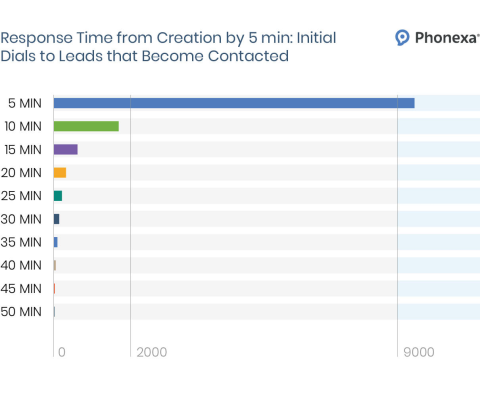
It shrinks margins because you pay the full cost for lead generation but receive only a fraction of the value. Which means $10,000 spent to gain 100 leads yields only 10 prospect conversations. Not just has your cost per acquisition (CPA) increased, but it has also effectively decimated your profit margin on the back end.
Here’s the workaround.
Connect marketing forms and ads directly to your sales CRM and dialers to remove the human delay from the first critical steps.
Applying automation requires:
Before committing to the tools, get the visibility by documenting:
Also, it’s where some of the real issues show up since most delays stem from the fact that no one owns the in-between states. Automation only works once those states are explicit.
Avoid fake or spammy leads that deter the system by defining parameters that qualify a lead:
A part of your B2B lead generation strategies includes ensuring only quality leads enter the sales workflow until their data supports a meaningful first action.
What follows is the enrichment of firmographic data to automatically normalize job titles into roles.
Let automated logic route the lead to the appropriate representative based on territory, account size band, or other factors.
It works when you—
An Account Executive earning $100k spends 5 hours a week on manual coordination, which costs the business around $12,500 in annual productivity. It results from lead status lags across tools when systems fail to reflect the current state.
A 2023 Asana report found that employees spend 58% of their day on work, specifically, on manual status updates and information searches.
Here’s the fix:
Improve the bottom line by keeping critical data fields consistent across tools rather than relying on manual updates.
Semawork had its CX team waste 40+ hours on manual coordination across Salesforce and Asana, doubling their per-customer onboarding costs. Integrating Salesforce, Asana, and Slack using an automated workflow triggered the moment a deal is marked Closed/Won to save 4 hours of daily manual work.
Here’s how you can make it work:
Field-level integration maps a specific data point, such as deal stage or priority, from one system, like Salesforce, directly to the matching field in another system, like Asana, rather than syncing entire records loosely. Syncing fields drives action.
That’s why a lot boils down to choosing tools and building a tech stack that supports native, bidirectional integration with real-time updates and clear ownership rules for each field.
Look for features and choose a plan that supports the integration you need. For example, check Asana pricing and features across its tiers to plan the integration you want. Asana’s Starter Plan gives you unlimited internal automations. But removing coordination gaps requires integration with Salesforce, Tableau, and other tools, which demands the Advanced Plan.
Synced fields trigger workflows without follow-ups, reducing senior time spent verifying information and improving margin.
For example,
Workflows will act on data directly. This frees team members from confirming task state and shifts their time toward work that moves projects forward.
Designing a workflow requires system controls that allow the process to move forward only when it meets the required conditions.
Some of these controls include:
A rule may require the lead to be contacted within 5 minutes. But allowing a 2-day delay in the CRM without triggering a system alert breaks workflow integrity.
Here’s how to drive it:
Role-based permissions restrict who can change essential workflow states. Below, in the Asana example, we can see how to set permissions for each user.
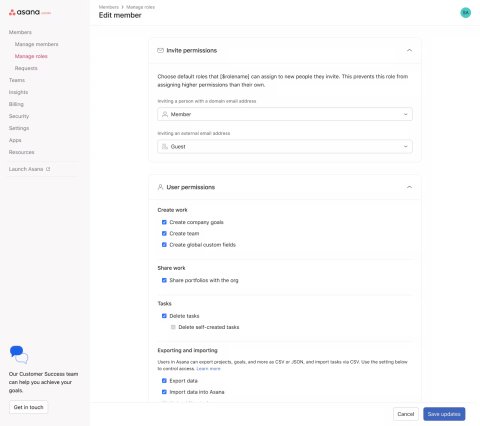
For example, a designer cannot mark the task as Done until the design lead reviews and confirms it.
Not setting role-based access controls in Asana or any other work management tool may lead an executive to close tasks prematurely, resulting in unplanned, time-consuming rework that affects margins.
Here’s what to do for setting up role-based controls
Define roles (not individuals) who have the right to approve specific project phases.
Examples include:
Identify a workflow step that locks the process to prevent unauthorized roles from changing protected fields. If a user lacks permission, the system must block the action (e.g., marking a Lead — Qualified) rather than logging it for later review by a senior.
Margin leaks when managers assign additional tasks to reliable top performers while others remain underutilized.
The 2023 Professional Services Maturity Benchmark from Service Performance Insight (SPI) highlights how weak capacity management directly contributes to revenue leakage.
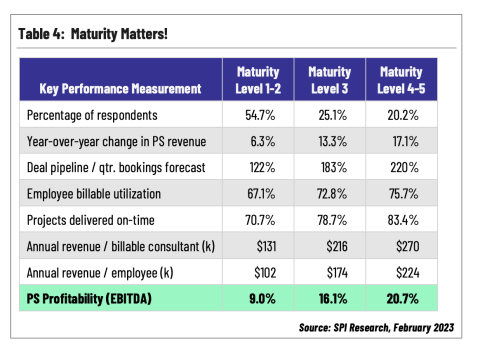
Companies that rely on manual individual effort (Levels 1-2) struggle with significantly lower profitability than those with optimized, data-driven processes.
In fact, 77% of employees take on extra work beyond their job descriptions, often attributed to the paradox of performance punishment.
Over time, this concentrates effort among a smaller group of contributors while other capacities remain underused, increasing delivery risk and labor inefficiency.
Here’s the workaround:
Capacity management removes ambiguity by providing real-time visibility into team bandwidth.
So instead of assigning tasks based on who is available, managers allocate work based on how much capacity a person has left within a defined period.
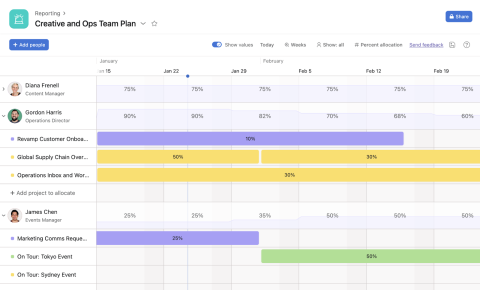
For example, Asana Workload enables leaders to monitor work across multiple projects in a single view, rebalancing tasks before burnout occurs.
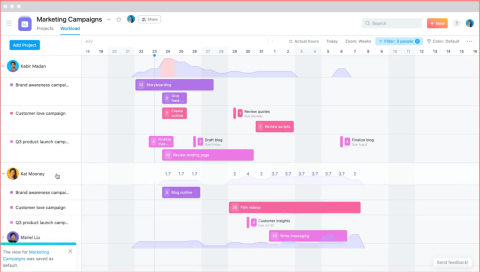
Source
In practice, this allows managers to see:
To implement capacity management in practice:
Choose a single unit that reflects delivery effort, such as hours or points (e.g., employee effort score), and keep it consistent across teams to maintain comparable capacities.
Here’s how to choose one:
Define how much work someone can reasonably handle, and assign either a percentage of time, hours, or project counts by setting the staffing load ceiling.
Tip: Account for time in the meetings to ensure the meeting's capacity limit includes non-billable time.
In case of overload, reassign or reschedule work immediately to prevent overtime or rushed deliveries. Use the visual data to make a case for adjusting project timelines or hiring additional resources before profit margins drop.
Audit the margin against resource usage to compare the total effort spent against project revenue.
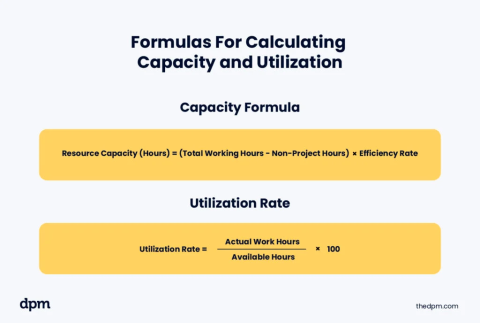
This data helps in two ways:
Margins are affected when work moves between teams without a system-defined handoff. Manual handoffs keep tasks siloed in inboxes, with unclear ownership and progress that relies on someone noticing the work is ready to move.
You don’t want onboarding teams wasting billable hours re-collecting data that the sales representative already gathered!
Here’s what you can implement to avoid such issues:
System-driven handoffs use logic-based triggers to move the project, not manual introductions or follow-up emails. When a transition happens, the system transfers the required data and automatically triggers the next action.
For example, when a lead converts to a customer, the system sends a welcome email with an onboarding video. Followed by creating an onboarding task set and assigning ownership in the same step. No need for anyone to introduce the customer or copy information between tools.
Such timing matters because a 2025 OnRamp report found that 48% of customers abandon onboarding when they don't see value quickly. Moreover, 57% of companies that reduced onboarding investment saw churn increase within six months.
You can bring down such churn rate, vis-à-vis the margin, by building system-driven handoffs in the following manner:
Configure CRM with validation rules for each event where handoffs occur. For example, marking the deal as closed/won in HubSpot is a must before it moves to the post-sales team. It compels the team responsible for marking the event complete, gathering the data, and delivering the needs before the handoff occurs.
Integrate tools that enable AI automation as soon as the project status changes with the completion of an event. For example, you could connect email via Zapier, so that closed deals trigger the Getting Started video and a link to a kickoff questionnaire.
Define the activity approval before allocating a team's billable hours to a task. Let the project manager review and accept the project within the system before marketing it as active.
For example, if the sales data is insufficient, the project manager can reject it and send it back to the Sales stage. Setting up such constraints prevents the team from charging hours to a project that isn't ready for execution, thereby protecting the margin loss.
When executing a B2B strategy, margin loss comes from process leaks. Identifying where these leaks occur in the funnel and implementing preventive controls materially improves the bottom line. Execution failures and miscommunication often drive margin leaks. Gaps in capacity management and poorly structured handoffs contribute to the same problem.
For a B2B organization, success in stopping margin leaks often boils down to ensuring every hour worked contributes to revenue and every contract reflects actual performance.
Closing these specific leaks makes that possible and shifts the margin from something you defend to something you scale.